

How to Build Always-On Applications on Azure
By Stephane Eyskens

Today’s CloudPro Expert Article comes from Stéphane Eyskens, a Microsoft Azure MVP and seasoned solution architect with over a decade of experience designing enterprise-scale cloud systems. Stéphane is the author of The Azure Cloud Native Architecture Mapbook (2nd Edition), a comprehensive guide featuring over 40 detailed architecture maps that has earned 5.0 stars on Amazon and become an essential resource for cloud architects and platform engineers.
In the article below, Stéphane tackles one of the most challenging aspects of Azure architecture: building truly resilient multi-region systems, with concrete examples using Azure SQL, Cosmos DB, and Azure Storage, complete with code samples and Terraform scripts you can adapt for your own DR testing.
Happy reading!
- Shreyans Singh
Editor-in-Chief
I like to say that Azure is simple… until you go multi-region. The transition from a well-designed single-region architecture to a truly resilient multi-region setup is where simplicity gives way to nuance. Concepts that seemed abstract (high availability versus disaster recovery, failover semantics, DNS behavior, data replication guarantees) suddenly become very real, very concrete, and sometimes painfully operational.
This article is written for architects and senior platform engineers, who already understand the fundamentals but are required to build solutions that must remain available despite regional outages, service failures, or infrastructure-level incidents. The scope is intentionally narrowed to Recovery Time Objective (RTO). Data corruption, ransomware, and backup-based recovery are explicitly out of scope. Instead, the focus is on how applications and data services behave during live failover scenarios, and how architectural decisions, sometimes subtle ones, can make the difference between a seamless transition and a prolonged outage.
Through concrete examples using Azure SQL, Cosmos DB, and Azure Storage, this article explores how replication models, DNS design, private endpoints, and SDK behavior interact at runtime, and what architects must do to ensure their applications remain functional when regions fail.
Rather than focusing on theoretical patterns, the goal here is pragmatic—minimizing downtime and operational friction when things do go wrong. You’ll see diagrams, Terraform and deployment scripts, plus .NET code samples you can adapt for your own DR tests and game days.
Before getting into the details, let’s briefly revisit the difference between high availability (HA) and disaster recovery (DR).
HA and DR exist on a spectrum, with increasing levels of resilience depending on the type of failure you want to withstand:
Application-level failures: In some cases, you may simply want to tolerate application bugs—for example, a memory leak introduced by developers. Running multiple instances of the application on separate virtual machines, even on the same physical host, can already prevent a full outage when one instance exhausts its allocated memory. That is for instance, what you would get if you spin up 2 instances of an Azure App Service within the same zone (no zone redundancy).
Hardware failures: To handle hardware failures, workloads should be distributed across multiple racks. That is what you would get if you’d host virtual machines on availability sets.
Data centre–level outages: To withstand more severe incidents, workloads should be spread across multiple data centers, such as by deploying them across multiple availability zones. You can achieve this by turning on zone-redundancy on Azure App Service or use zone-redundant node pools in AKS. With such a setup, you should survive a local disaster such as fire, flooding, etc.
Regional outages: Finally, to survive major outages, such as a major earthquake, a country-level power supply issue, etc., workloads must be deployed across geographically distant data centers. You can achieve this by deploying workloads across multiple Azure regions in active/active or active/passive mode.
Looking at Azure SQL
Let’s first analyse the different data replication possibilities with Azure SQL. Table 1 summarizes the different capabilities.
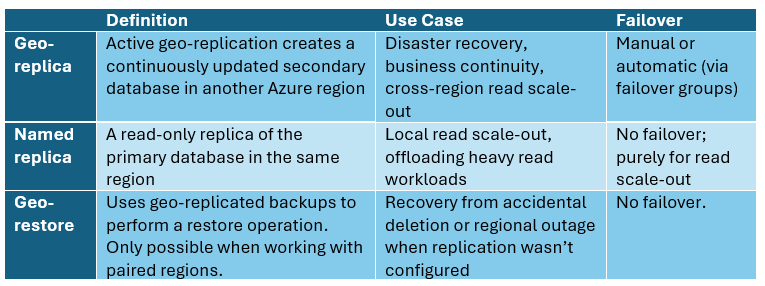
Table 1 – Replication capabilities
We’ll set aside named replicas and geo-restore, as the former does not contribute to disaster recovery and the latter is likely to introduce significant downtime and potential data loss. This leaves geo-replication as the remaining option. As you might have understood by now, using Azure SQL’s built-in capabilities, you cannot achieve a full ACTIVE/ACTIVE setup since it doesn’t support multi-region writes. This means that you can only have one read-write region and the secondary region(s) are read only.
Table 2 outlines the two available geo-replication techniques.
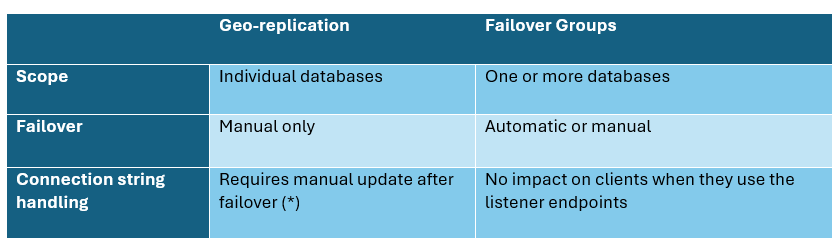
Table 2 – Geo replication options
Active geo-replication may require updates to connection strings or DNS records to point to the new primary after a failover. That said, the actual impact depends on where (*) the client application is located as well as how you deploy to both regions. Let’s look at this in more detail. Figure 1 illustrates an active geo-replication setup between Belgium Central and France Central.
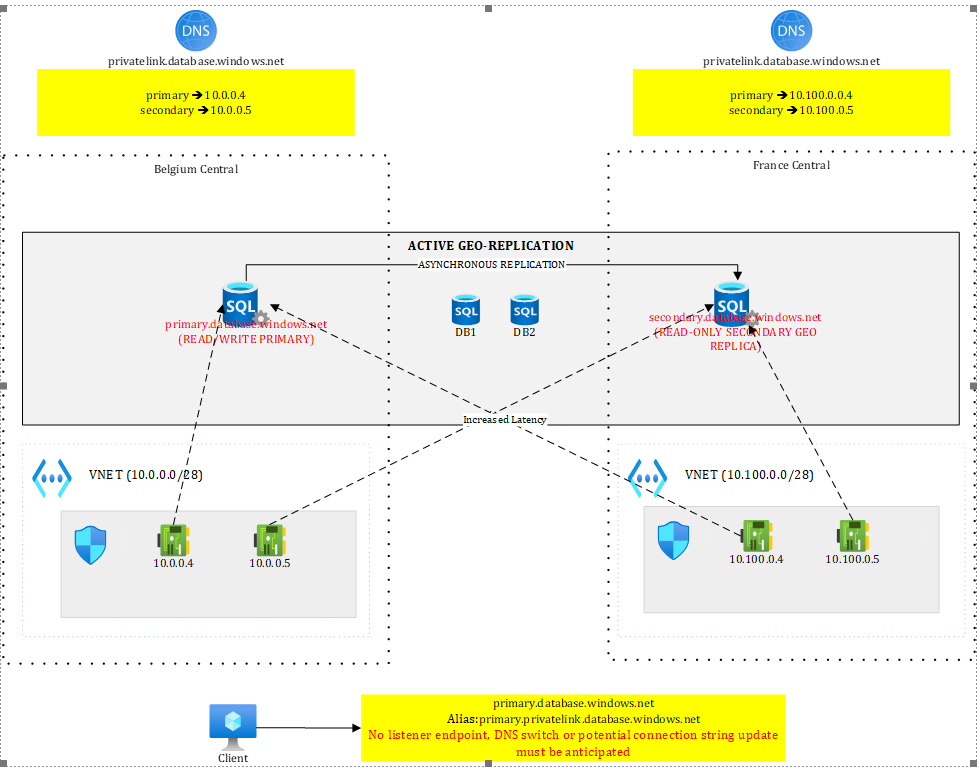
Figure 1 – SQL geo replication with active geo replication
In such a setup, under normal circumstances:
Workloads in the primary region (Belgium Central) can connect to the primary server in read/write mode
Workloads in the primary region can perform read-only activities against the secondary replica, providing they tolerate the extra latency incurred by the roundtrip to the remote region (France Central).
Workloads in the secondary region (if any), can perform read-only operations against the read replica with no extra latency.
The configuration shown in Figure 1 supports a database-only failover. Both regions expose private endpoints to both SQL servers and rely on region-scoped DNS zones.
Although Private DNS zones are global by design, keeping them regional allows each region to resolve both the primary and secondary servers. This requires four DNS records in total—primary and secondary endpoints registered in each regional zone.
With a single shared DNS zone, this would not be possible: while all four private endpoints could be deployed, only two DNS records would be registered, since the endpoints map to just two FQDNs (primary and secondary). While this approach works, it keeps the regions siloed and prevents any cross-region traffic. From a resilience standpoint, it is preferable to provide as many fallback paths as possible.
Moreover, as we will see later, with other resources such as Storage Accounts, a single DNS zone would force us to update the DNS records upon failover, causing a minimal downtime. Bottom line: using multiple DNS zones prevents issues during failover.
Back to active geo replication! In case of failover, SQL servers switch roles: the primary becomes secondary and vice versa. This concretely means that the connection string primary.database.windows.net targets the read/write region in a normal situation but a read-only or unavailable one after failover. Workloads using this connection string would either stop working (if the regional outage persist), either talk to a read-only database instead of a read-write one, once the failover completed. Similarly, the connection string secondary.database.windows.net usually targeting the read-only region under normal circumstances now targets the read-write one after failover.
Knowing this, a few options exist:
You may choose to fail over everything (database+compute). In that scenario, workloads running in the secondary region can use their default secondary connection string, which will automatically target the new primary after failover. This approach requires the deployment pipeline to be region-aware, detect the target region, and apply the appropriate connection string. When deployed in the primary region, the application should use primary.database.windows.net, while in the secondary region it should already be configured with secondary.database.windows.net. This design eliminates the need for any connection string changes after failover. If your webapps, K8s pods, etc. are already up and running, the only thing you still have to do is route traffic to them. Any other SQL client not running in the secondary region (eg: on-premises), would have to update its connection string to target the new primary.
You may choose to redeploy the compute infrastructure (web apps, etc.) to the secondary region only in case of regional outage. This approach is cheaper but risky as you’re not guaranteed to have the available capacity and it is causing a significant downtime. However, such an approach allows you to adjust your pipelines, specify the right connection string and simply redeploy your infrastructure and/or application package.
If you want to deploy the application with the exact same settings in both regions, you’ll need to update the connection string used by workloads in the secondary region, since primary.database.windows.net will now resolve to an unavailable server after failover. If the original primary later comes back online, it will return as a secondary (read-only) replica, which would not support write operations. You can as well make your application failover aware (**).
You can’t simply update DNS, meaning making secondary target primary and vice versa, because the FQDN (primary-or-secondary.database.windows.net) is validated by the target server, and the names must match—so redirecting it to a different server would simply fail.
In conclusion, when using active geo-replication as the replication technique, you should make your applications failover-aware (**) and pre-provision both connection strings and implement the failover/retry logic in the application code itself. You may wrap your Entity Framework context into a factory to abstract away the retry logic. Given we typically use a scoped lifetime, you may expect some HTTP requests to fail (in case of an API) but new instances targeting the right server would ultimately succeed without having to restart the application. You may as well use a geo-redundant Azure App Configuration and failover it along SQL, then switch the primary server connection string after failover. The SDK allows you to monitor a sentinel key and to reload the configuration without having to restart the application:
configBuilder.AddAzureAppConfiguration(options =>

{

options.Connect(new Uri(”<your-app-config-endpoint>”), new DefaultAzureCredential())

// Load all keys that start with `TestApp:` and have no label

.Select(keyFilter: “TestApp:*”, labelFilter: LabelFilter.Null)

.ConfigureRefresh(refreshOptions =>

{

// Trigger full configuration refresh only if the `SentinelKey` changes.

refreshOptions.Register(”SentinelKey”, refreshAll: true);

});

});
More on App Configuration and the sentinel key https://learn.microsoft.com/en-us/azure/azure-app-configuration/howto-best-practices?tabs=dotnet
Upon failover, you would update the sentinel key, modify connection strings in App Configuration or tell the apps that they failed over, letting them pick the new configuration without the need to restart them.
As an alternative to active geo-replication, you can use failover groups, which allow one or more databases to fail over together to another server. A key benefit of failover group compared to active geo-replication, is the presence of two stable listeners: one for read-only traffic and one for read/write operations. These listeners remain constant and always point to the current primary and secondary servers. During a failover, applications continue connecting through the listeners rather than connecting directly to a specific SQL server, eliminating the need for connection string changes.
Figure 2 illustrates the situation when the primary region is working fine.
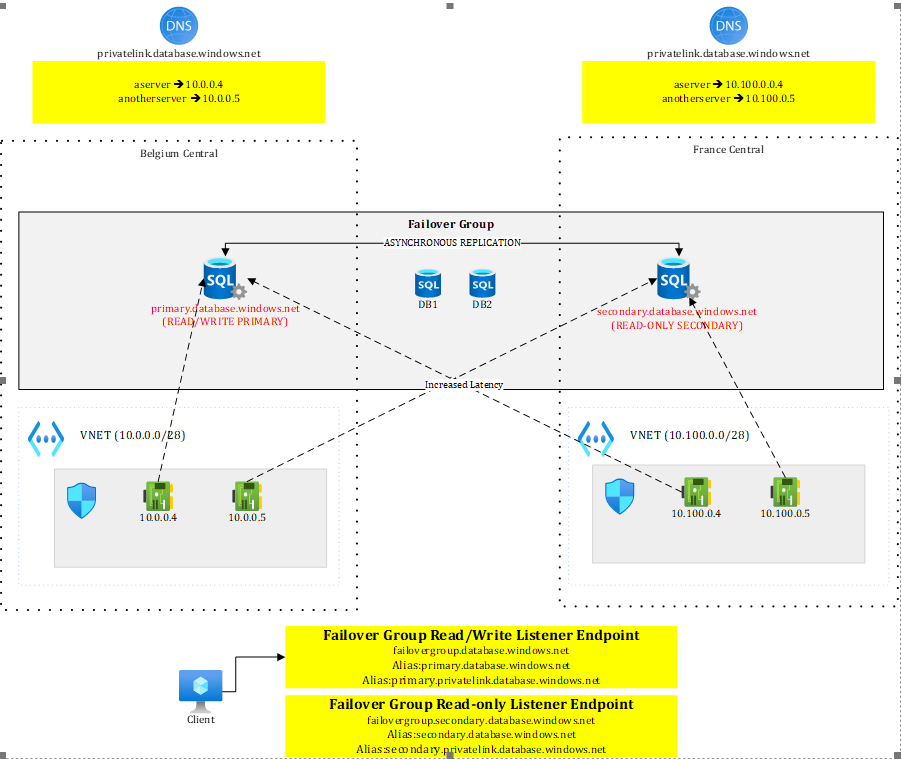
Figure 2 – Failover group before failover
We see that clients connect to listener endpoints. The failover group comes with two endpoints:
<failovergroupname>.database.windows.net
<failovergroupname>.secondary.database.windows.net
These public DNS records are managed by Microsoft and they work with aliases pointing to the replicated servers. The read-write endpoint will always target the server that has the primary role. In Figure 2, it currently points to primary.database.windows.net, our server in Belgium Central.
Figure 3 shows the situation after failover
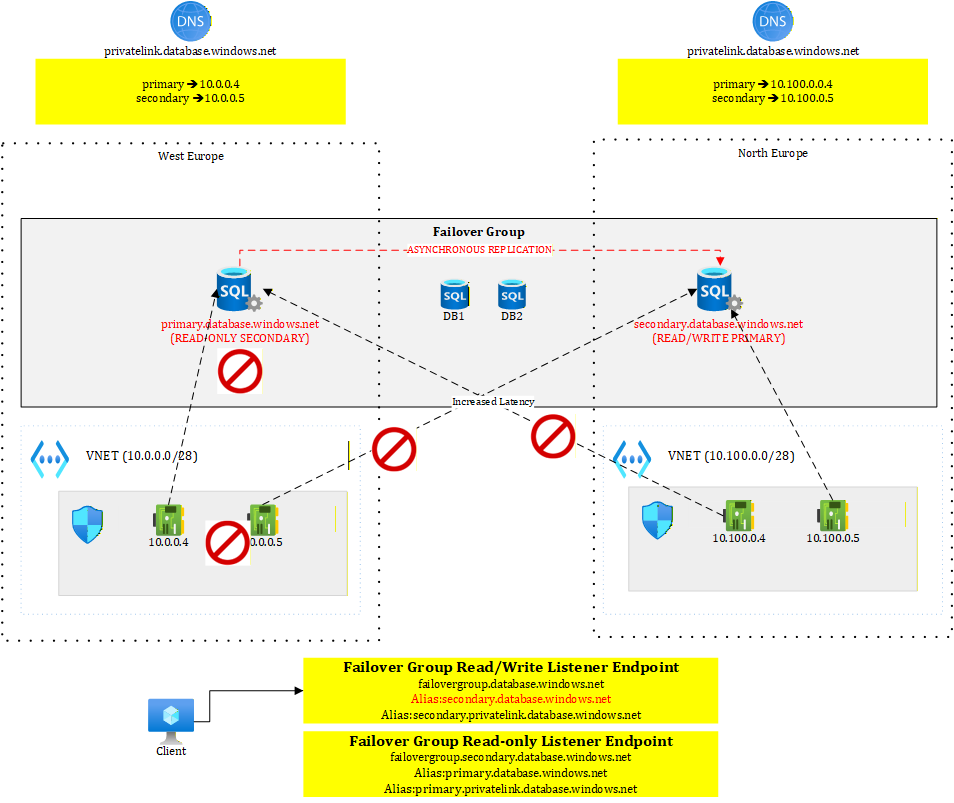
Figure 3 – Failover group after failover
We see that this time, the read/write endpoint points to secondary.database.windows.net, our server in France Central, which has become the new primary. Failover groups greatly simplify client connectivity: when private endpoints and DNS zones are properly configured, the failover is completely transparent to connected clients.
To help you test this, I have created a GitHub repo https://github.com/stephaneey/azure-and-k8s-architecture/tree/main/availability-samples/sql where you can find both a sample console application and some Terraform code. The solution is a simplified setup but let’s you grasp how failover groups work. You can find the explanations on how to deploy and test this in the repo itself.
Next, let’s look at how to maximize availability using Cosmos DB.
Looking at Cosmos DB
As of January 2026, Cosmos DB is the only Azure service that supports true active/active read-write deployments through its multi-region writes capability. For scenarios that do not rely on relational models or strict referential integrity—and where eventual consistency (most commonly session consistency) is acceptable—Cosmos DB is the preferred choice.
Figure 4 represents an API platform spanning two continents (Europe and US) and leveraging the multi-region writes feature.
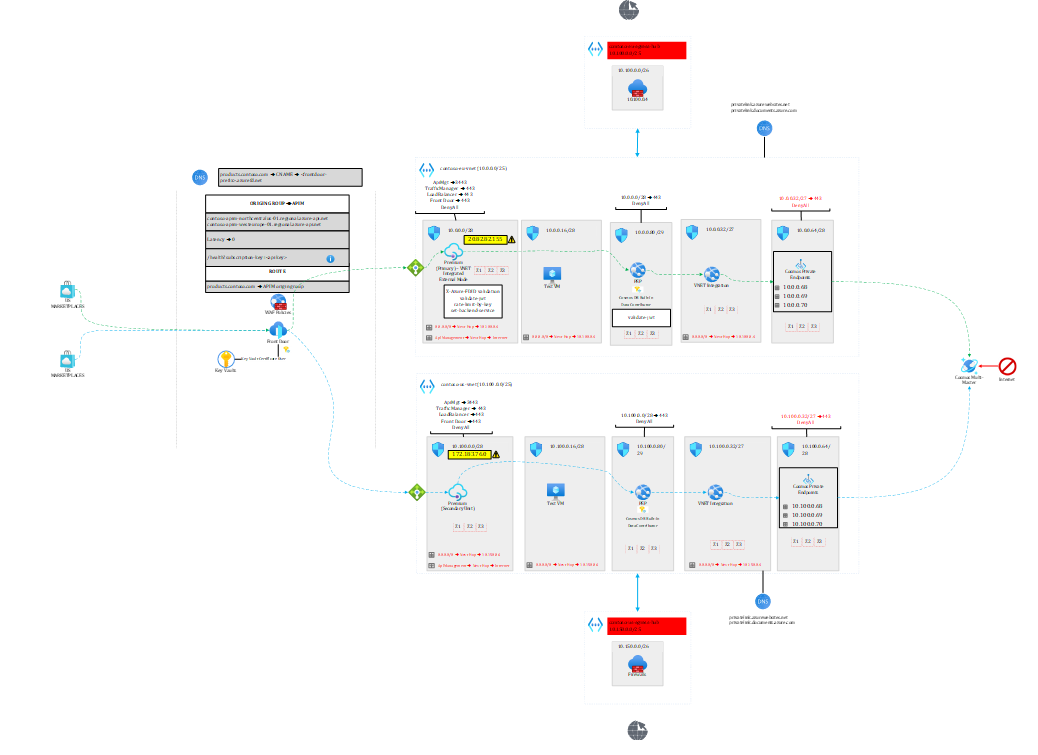
Figure 4 – Leveraging Cosmos DB multi-region writes for a global API platform
Note 1: the raw diagram, extracted from my book, is available here https://github.com/PacktPublishing/The-Azure-Cloud-Native-Architecture-Mapbook-Second-Edition/blob/main/Chapter03/diagrams/diagrams.vsdx
Note 2: I delivered a 25-minute live demo of the above setup during a Microsoft API Management event (
starting at minute 53 of the recording). Microsoft slightly fast-forwarded the video, so the pace is a bit quicker, but it remains possible to follow if you stay focused 😊.
In a nutshell, US callers are sent to the US backend and EU callers to the EU backend. What is interesting in this architecture is that every layer is failure-resistant.
The entry point, Front Door uses geo-proximity by default but is able to send US callers to EU and vice versa in case the regional backend is unhealthy. API Management’s regional gateways forward to their regional backends.
Each of the backends hosted on app services is leveraging the Cosmos DB SDK, which is smart enough to detect whether the corresponding Cosmos DB region is available or not. The API will seamlessly switch to the available region in case of a regional failure impacting only Cosmos DB. That’s what I’m going to focus on in this article.
Figure 5 focuses on the backend part.
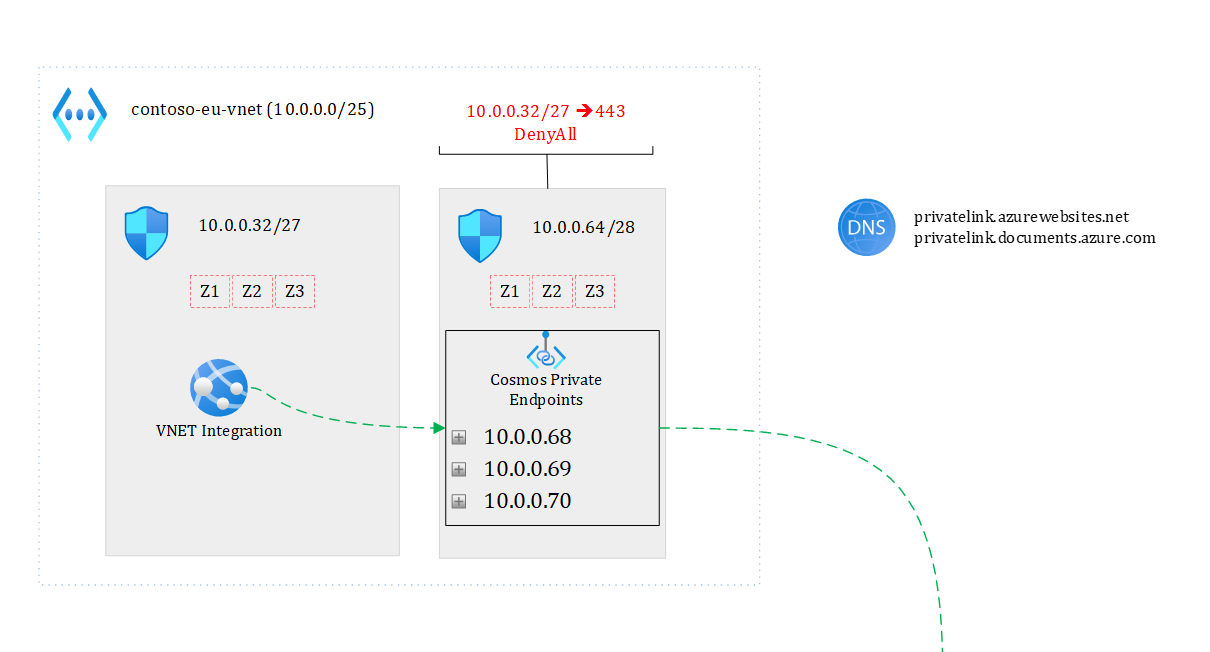
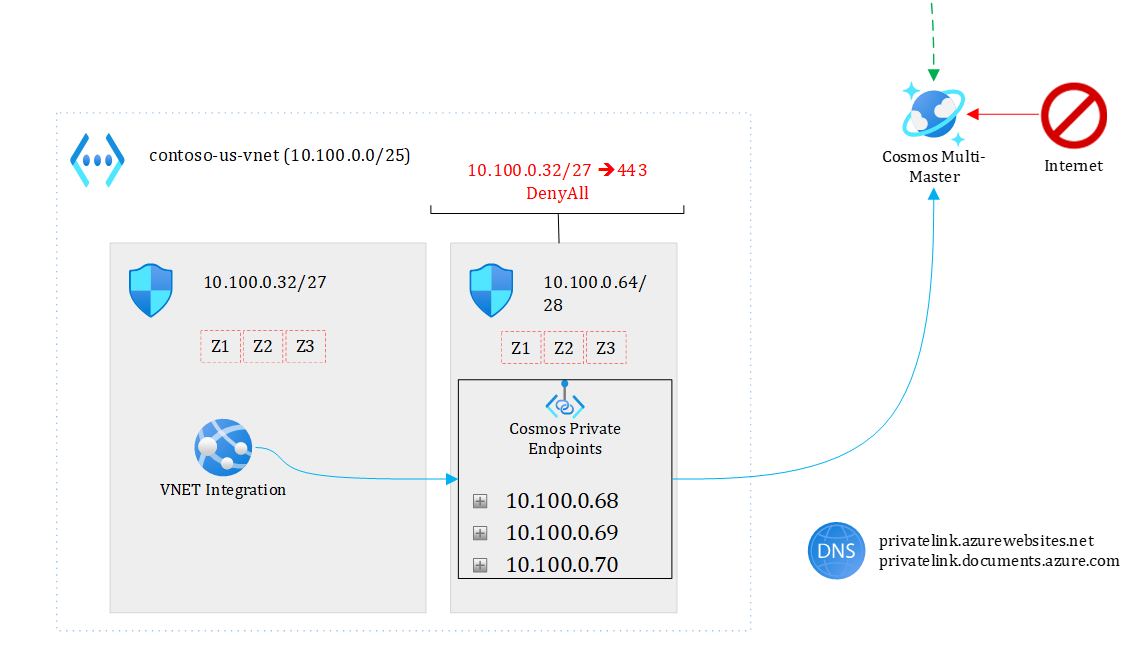
Figure 5 – focusing on backend
My US and EU app services talk respectively to their regional Cosmos DB endpoint under normal circumstances. Note that each region has three private endpoints (one for each region plus the non-regional endpoint), which makes it possible from EU to go to the US and vice versa through the private endpoint plumbing. If, for some reason, the EU backend cannot talk to the EU Cosmos endpoint, it will take the US path. Of course, there is an impact on latency but the solution keeps working and the application doesn’t even need to be restarted. In case of a full regional outage (say entire EU is down), Front Door would direct all API calls to the US backend.
This architecture can resist to both local outages and full regional ones.
To help you test this built-in resilience using Cosmos, I have developed a sample API along with the Terraform bits that deploy a simplified setup shown in Figure 6. The repo is available here
https://github.com/stephaneey/azure-and-k8s-architecture/tree/main/availability-samples/cosmos
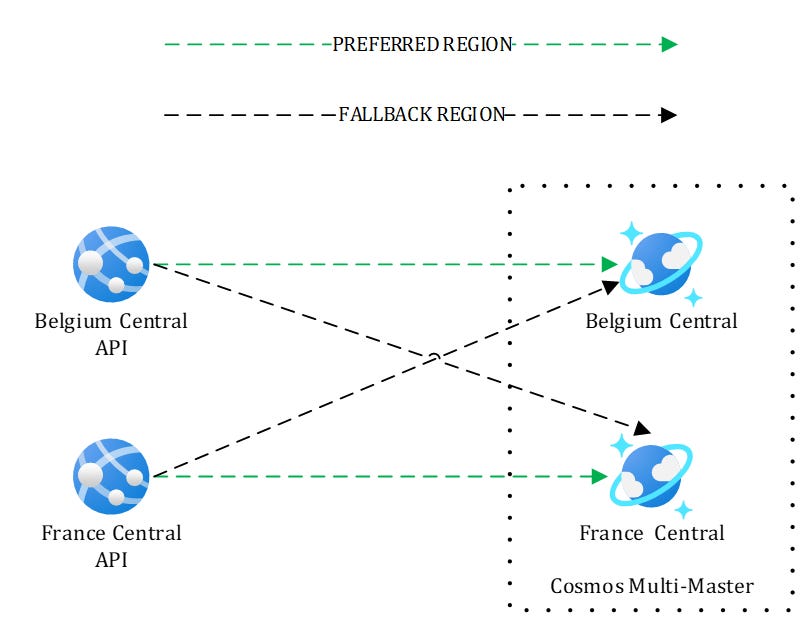
Figure 6 – Simplified setup for testing
Here, I’m not using private endpoints but this is enough to understand the SDK mechanisms. After you have deployed the solution, you should end up with the following resources:
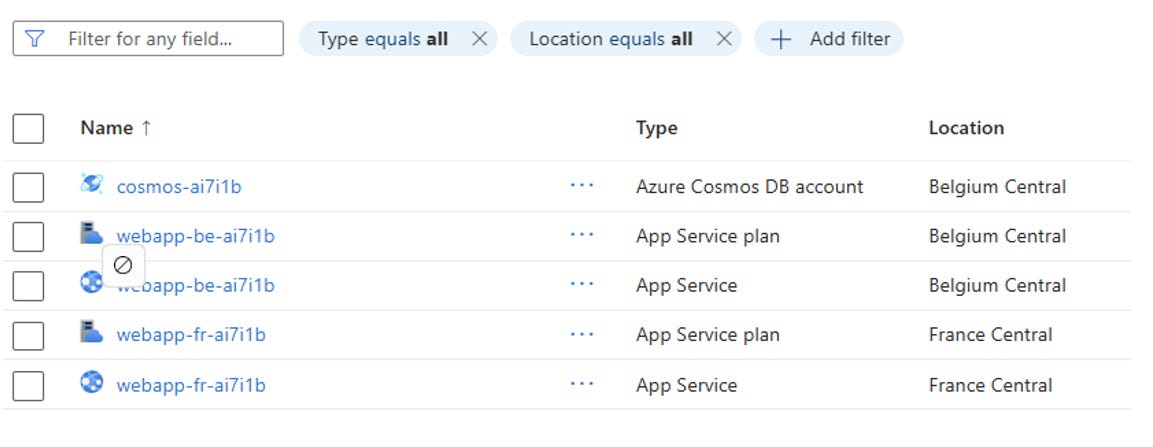
Figure 7 – Resources deployed by the sample application
I made sure the webapp’s managed identities are granted access to Cosmos and I pre-deployed a database and a container.
Additionally, each web app indicates its preferred region using environment variables to the Cosmos SDK:
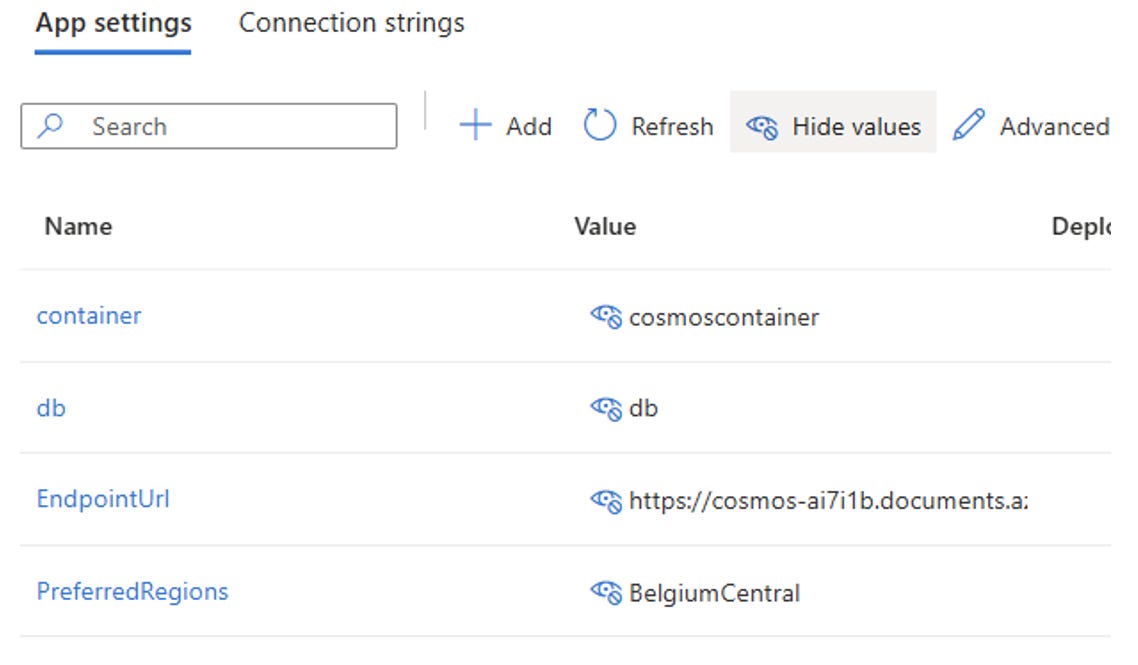
Figure 8 – Cosmos DB settings defined as environment variables
You can directly test the APIs using Postman or Fiddler, by first performing a POST request (Figure 9), to create a document, followed by a GET request (Figure 10):
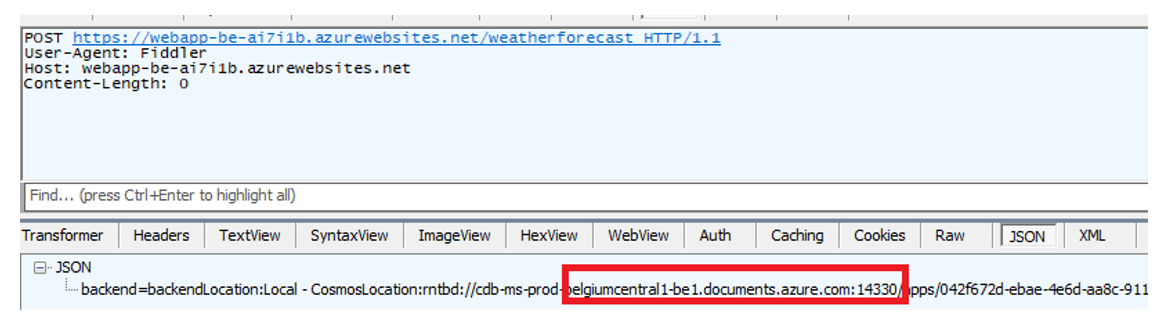
Figure 9 – Sample POST request to create a document
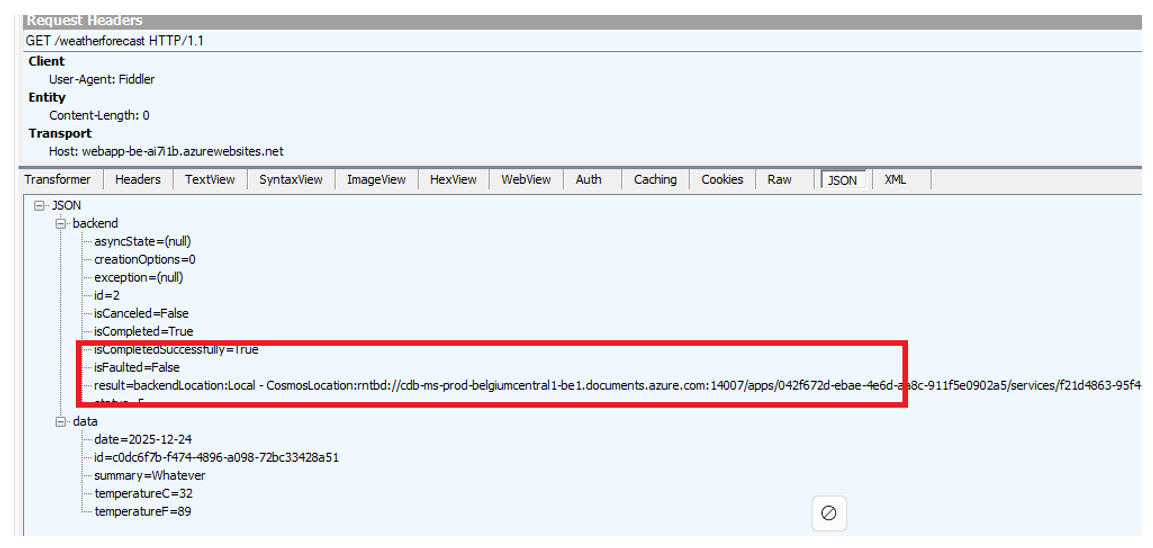
Figure 10 – Sample GET request to get the latest weather forecast
I developed the API in such a way that it indicates which Cosmos region was used by the backend service to perform the operation.
Now, you can start playing with Cosmos to see how both APIs react. Here are the following things you can test using the Azure Portal or Azure CLI as you wish:
Marking one of the Cosmos regions read only. In such a case, both APIs (Belgium and France) should automatically go to the remaining writable region, but reads (GET queries) would still pick their regional instance.
Deleting one of the Cosmos regions. In such a case, both APIs should automatically go to the remaining region for both reads and writes
Take a Cosmos region offline. In such a case, an automatic failover should take place to the remaining region. Note that you must create a support ticket to get it back online. Just try this one after having tried the other changes.
Make sure to run both POST and GET request between each steps and check which Cosmos backend instance is used by the API. You’ll notice that whatever you do at Cosmos level, the backend is smart enough to keep working.
All the required instructions are provided in the repo.
Last but not least, let’s turn to Azure Storage.
Looking at Azure Storage
Let’s look at Azure Storage, and more specifically at Blob Storage, Table Storage, and Queue Storage, which are widely used across all types of applications. A very common scenario involves Azure Durable Functions as well as stateful Logic Apps, whose default state store is Azure Storage. Because the orchestration state is persisted in Azure Storage, it is essential to understand what happens to this state in the event of a failover.
For sake of brevity, I will only show how to handle both the blob and table sub resources but the principles are exactly the same with the queue service.
Here are the replication capabilities of Azure Storage.
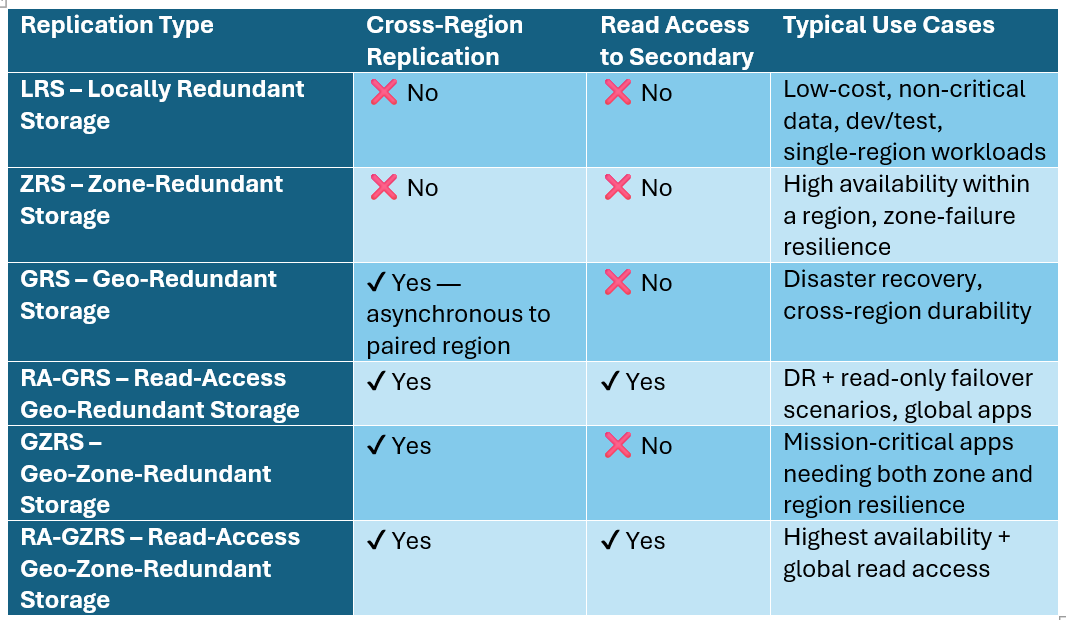
All the above options are only available in paired regions. Additionally, blobs can also be replicated using the object replication feature, but this is by no means comparable to the above options.
Azure Storage replication is rather easy when dealing with internet facing Storage Accounts and public DNS but it gets a bit more complex when using private link.
A common misunderstanding is the impact of using a single DNS zone for private link, which would automatically incur additional downtime in case of regional outage and storage failover.
Figure 11 illustrates the problem:
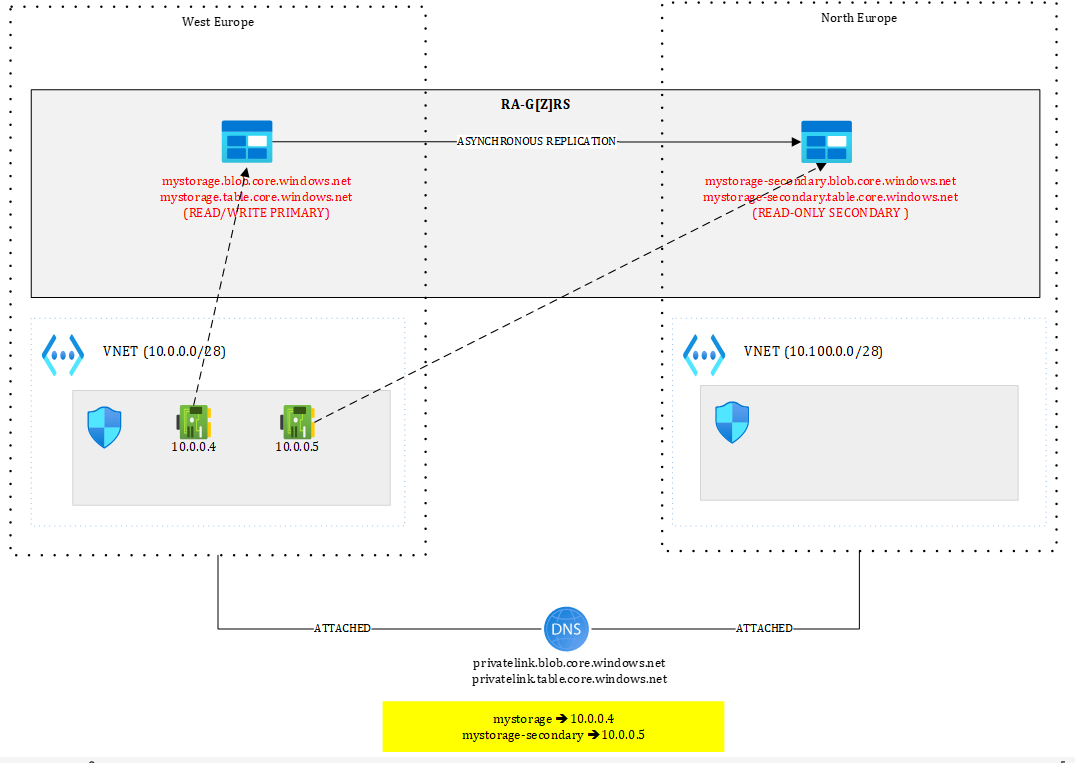
Figure 11 – Shared DNS zones
Our shared DNS zones are attached to both virtual networks. From the primary region, I can have two private endpoints, one targeting the primary in West Europe and the other one targeting the secondary in North Europe. Both private endpoints are located in West Europe.
Because the FQDN of the Storage Account is mystorage.<service>.core.windows.net, I can only have one record at a time in the DNS zone. I could pre-create the private endpoints in the secondary region but not register them in the zone. In case of Storage Account failover, I would need to update the DNS records and put the IPs of the private endpoints in North Europe. Even doing this wouldn’t work:
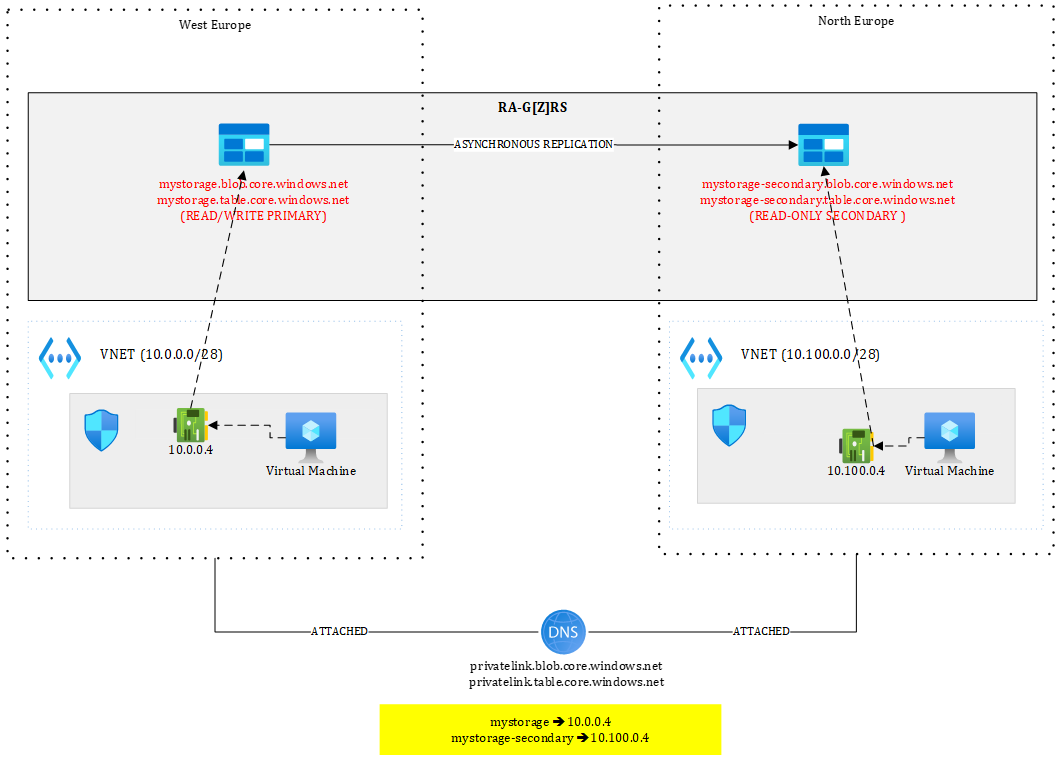
Figure 12 – Suboptimal setup using shared DNS zone
With a setup as shown in Figure 12, if I have one blob “test.txt” in the “test” container, the resulting URIs will be:
https://mystorage.blob.core.windows.net/test/test.txt (primary)
https://mystorage-secondary.blob.core.windows.net/test/test.txt (secondary)
The primary URL will be reachable from the VM located in the West Europe VNET but not from the one located in North Europe since mystorage.blob.core.windows.net resolves to 10.0.0.4, meaning the private endpoint of West Europe, which is out of reach from North Europe (in this setup). Of course, you could peer those VNETs or route traffic through hubs but this is typically not what you’d want.
Moreover, after failover, you’d be in a situation as shown in Figure 13.
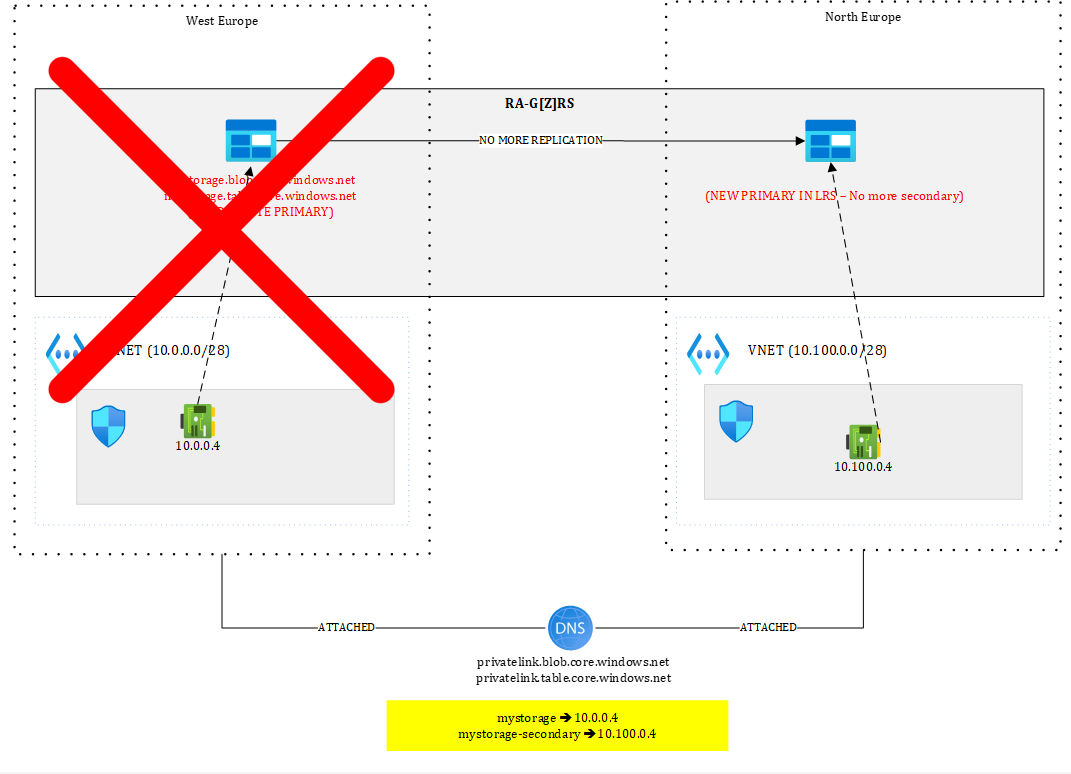
Figure 13 – Storage account after failover
The primary (West Europe) is gone. Perhaps the entire region is gone, meaning that 10.0.0.4 is lost, so even though you would have routed traffic initially from North Europe to West Europe, it’d stop working.
You’d be left with 10.100.0.4 still targeting the secondary but after failover, there is no more secondary...The failover process converts the Storage Account into a Locally Redundant Storage (LRS), so the notions of primary and secondary do not exist anymore. The North Europe has just become the new primary, making 10.100.0.4 now pointing to an unreachable target.
The only way to restore access to https://mystorage.blob.core.windows.net/test/test.txt from North Europe is to create a new private endpoint and update the DNS zone accordingly. You could pre-create the private endpoint prior to a failover but in any case, updating the DNS zone would be required. This would cause an additional short downtime and requires a scripted plan.
So, with Storage Accounts, you must use separate DNS zones if you don’t want to perform any intervention.
That is why, the best setup is the one shown in Figure 14:
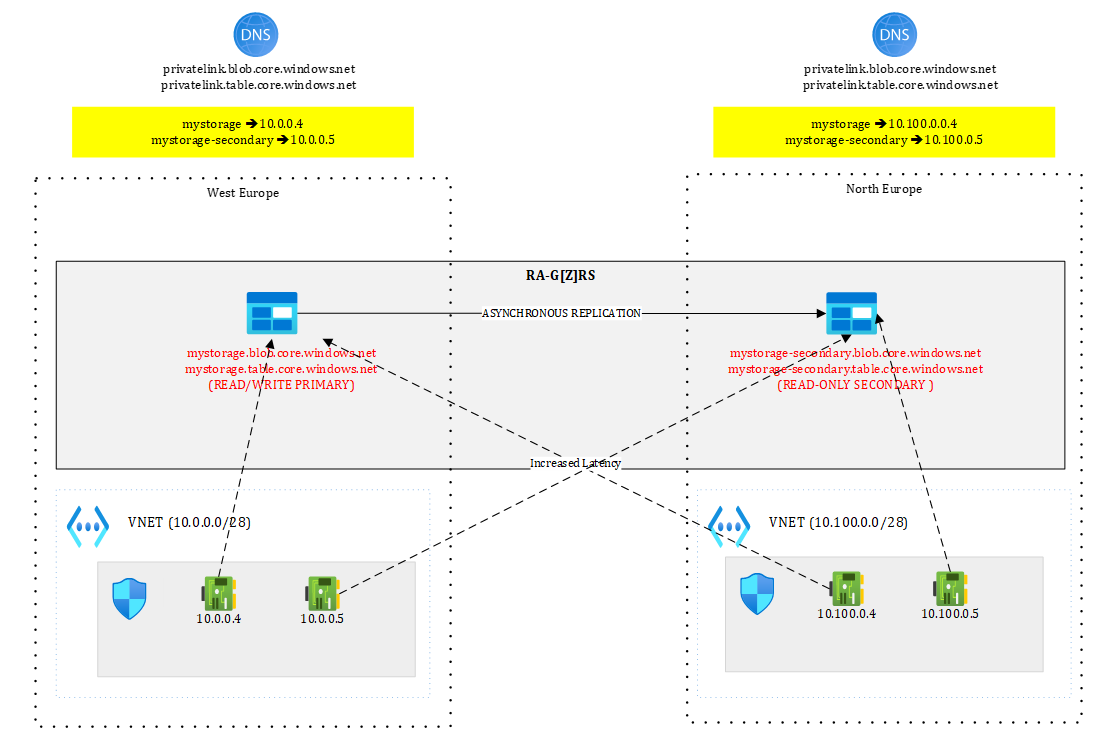
Figure 14 – Best setup with Azure Storage using separate DNS zones
Each region has its own private DNS zone and each holds a set of private endpoints targeting both primary and secondary. Now, both mystorage and mystorage-secondary are resolved and routable from both sides. From North Europe, a call to mystorage would go through 10.100.0.4 and hit the West Europe location.
After full regional outage, West Europe is lost but 10.100.0.4 is still targeting the primary, which means, the promoted North Europe location, while the secondary endpoint is lost again (this is unavoidable). This setup doesn’t require any intervention other than performing the failover itself. Needless to mention that your application will encounter exceptions while Azure Storage is failing over, so you need to make sure to correctly handle exceptions.
Coming back to a more concrete example with Durable Functions, you could have an active/passive setup like this one:
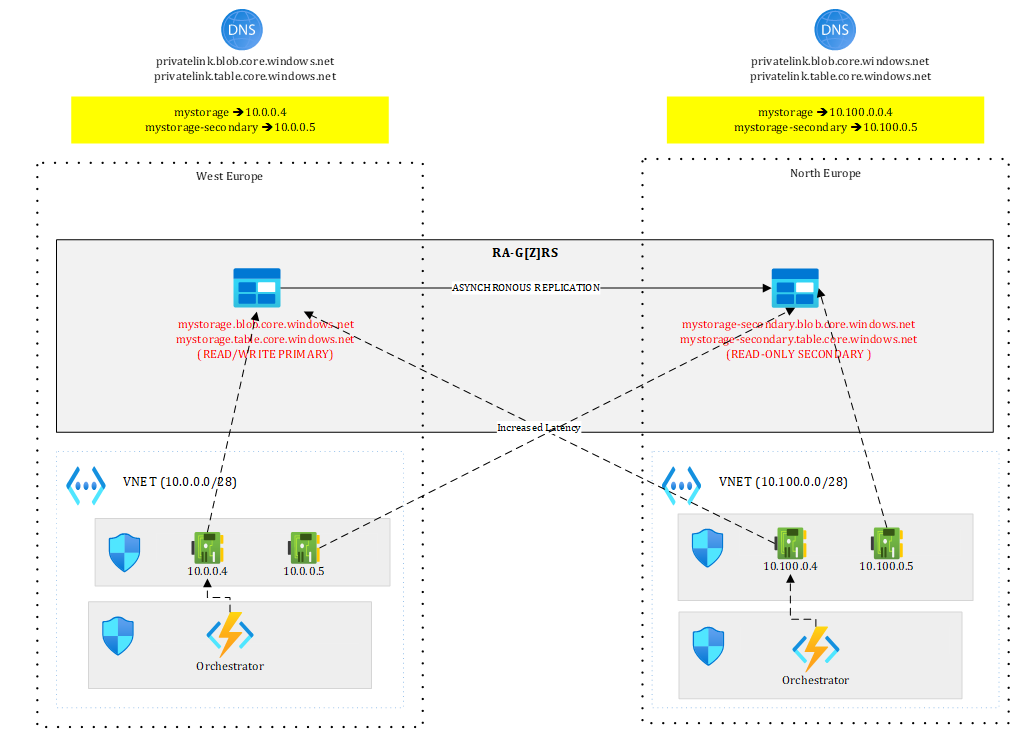
Figure 15 – Adding the orchestrator to the mix
Where your orchestrator, hosted on an App Service levering VNET integration is getting access to the Storage Account through 10.0.0.4 to persist state. The North Europe version of the orchestrator could already be deployed but stopped to avoid possible interferences.
In case of regional outage or DR test, you failover the Storage Account and once the failover completed, you start the orchestrator in North Europe that now points to the new primary. Durable functions make mostly use of Queues and Tables to work and persist state. Once the failover completed, you should be able to resume ongoing orchestrations. However, since the data replication process is asynchronous, you may lose some of them.
To help you test this scenario, I have crafted a very little Durable Function available here https://github.com/stephaneey/azure-and-k8s-architecture/tree/main/availability-samples/storage that is just waiting for an external event:
public static async Task RunOrchestrator(

[OrchestrationTrigger] TaskOrchestrationContext context)

{

ILogger logger = context.CreateReplaySafeLogger(nameof(Function1));

logger.LogInformation(”Waiting for external event”);

var eventData=await context.WaitForExternalEvent<DateTime>(”event”);

logger.LogInformation(”external event received {0}”, eventData.ToString());

}

The orchestration is started by this HTTP triggered function:

public static async Task<HttpResponseData> HttpStart(

[HttpTrigger(AuthorizationLevel.Anonymous, “get”, “post”)] HttpRequestData req,

[DurableClient] DurableTaskClient client,

FunctionContext executionContext)

{

ILogger logger = executionContext.GetLogger(”Function1_HttpStart”);

// Function input comes from the request content.

string instanceId = await client.ScheduleNewOrchestrationInstanceAsync(

nameof(Function1));

logger.LogInformation(”Started orchestration with ID = ‘{instanceId}’.”, instanceId);

return await client.CreateCheckStatusResponseAsync(req, instanceId);

}
The idea is to start a new orchestration by calling the HTTP triggered function:
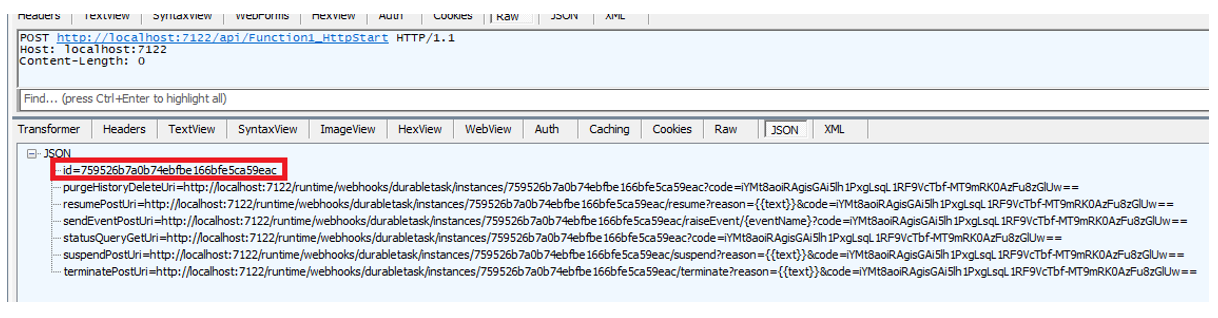
Figure 16 – Starting a new orchestration
And get the instance ID of the orchestration for later use.
After this, you can initiate the failover. Once completed, you should raise the external event and see if the orchestrator is able to resume this orchestration:
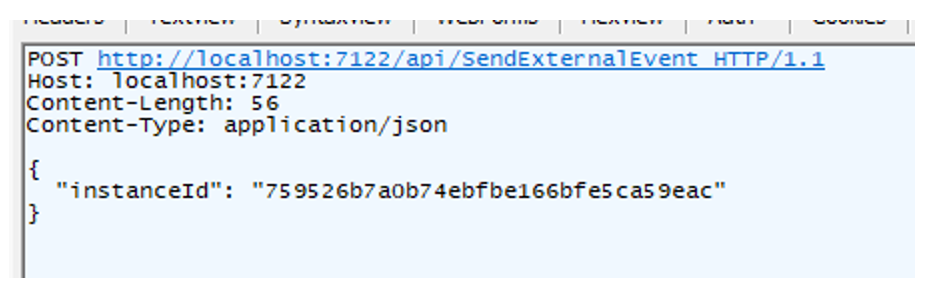
Figure 17 – Raising the external event
If everything works fine. The orchestration status should show as completed:
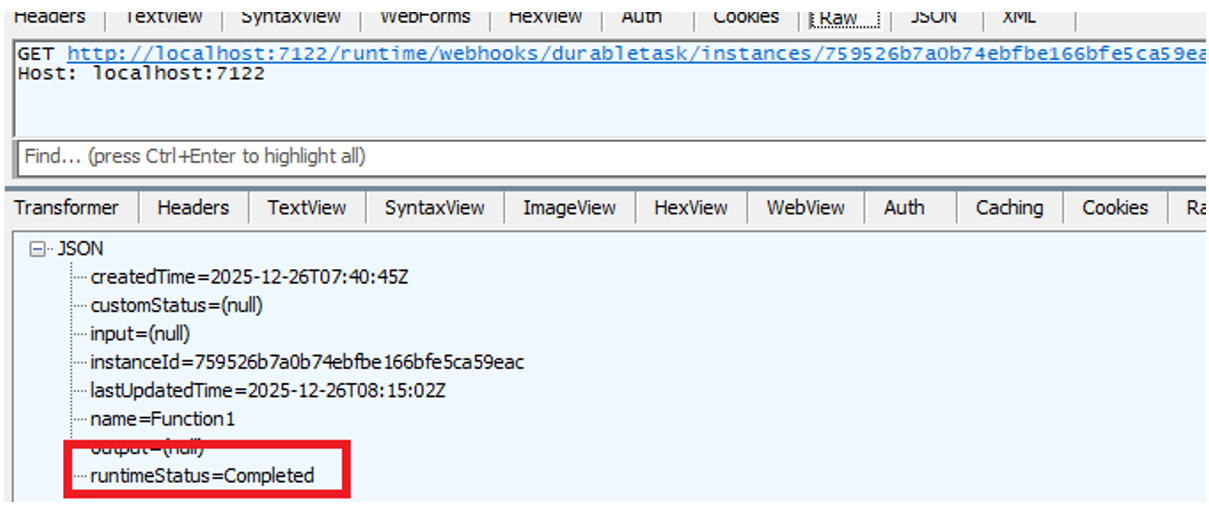
Figure 18 – Checking the orchestration status
You can test this easily locally by making sure to:
Use a GRS/GZRS/RA-GRS/RA-GZRS Storage Account
Bind your local solution to the Storage Account by assigning the connection string of your Storage Account to the AzureWebJobsStorage setting in local.settings.json
Of course, in this case, we use public DNS and an Internet facing Function App, which is way simpler than the enterprise-grade design I depicted earlier. This is however enough to experiment with a concrete use case.
Let’s wrap it up!
Designing for resilience in Azure is less about individual services and more about underlying foundations such as networking and DNS. Working with single or multiple DNS zones already has an impact on downtime.
As we have seen, Azure services offer powerful built-in capabilities, but they differ from one service to another and we’ve only seen three of them. Many other services have yet, a different behaviour.
A recurring theme across all scenarios is that infrastructure-level redundancy is not enough. Applications must be designed to tolerate transient failures, retry intelligently, and adapt to changing backend roles, especially in ACTIVE/ACTIVE configurations.
Ultimately, resilience is not achieved by flipping a single switch. It is the result of deliberate architectural choices, tested failure paths, and an honest acceptance of trade-offs—latency versus availability, consistency versus survivability, cost versus operational simplicity.
If there is one takeaway, it is this: multi-region architectures must be designed for failover from day one. When they are, regional outages become operational events rather than existential crises—and “always-on” stops being an aspiration and starts becoming an outcome.