

Your Container Just Broke. Here's How to Make the Right Call.
A simple framework for making the right call under pressure

Your container is acting up. Do you restart it or rebuild the whole image?
I’ve seen engineers waste hours on this because they defaulted to one or the other without thinking it through. So here’s how I think about it.
It comes down to one question: is the problem in how the container is running, or in what was built?
If it’s a runtime issue: the app got stuck, a config change hasn’t taken effect, something just needs a kick, restart. That’s the fastest path back to normal and there’s nothing wrong with it.
If the image itself might be the problem, restart won’t help. You’ll just redeploy the same broken thing. You need to rebuild.
Sounds simple, but the tricky part is knowing which situation you’re in. Here’s how I usually work through it.
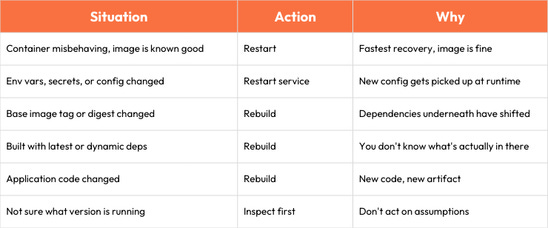
Config, env vars, or secrets changed? Restart the service. New values get picked up at runtime. No need for a new image.
Base image tag or digest changed? Rebuild. Even if your code is the same, the stuff underneath it isn’t. Your dependencies have moved.
You built with latest or your Dockerfile pulls in dynamic dependencies? Rebuild. You don’t really know what’s inside that image anymore. Something upstream could have shifted without anyone noticing.
Application code changed? Obviously rebuild. New code needs a new artifact.
Container is misbehaving but the image checks out- tag is right, digest matches, nothing has moved upstream? Restart. The image is fine, the container just needs a fresh start.
Not sure what version is even running? Don’t do anything yet. Inspect first. Check your image labels, check the digest. Then decide. Guessing under pressure is how you make things worse.
One small thing that helps a lot: bake a build timestamp into every image. A label, an env var, whatever. It takes seconds to add during the build and it means you can always verify what’s actually running where. Saves a ton of time when you’re half-awake and troubleshooting.
Here’s the whole thing as a quick reference:
This article is adapted from Mastering Docker on Windows by Michael D. Smith.